Already have it? Just run the new installer over the top of your existing
install. Your pilots, progress and settings are kept, and from 1.1 on the game updates itself.
What you get
Free to download and play, community-supported, with no paywalls and nothing to unlock
The complete 2001 game: two campaigns, Master Mode, the Secret Mission, and multiplayer for up to 8 pilots
Remastered for modern PCs: 2560×1440 widescreen, repainted interface, 4× terrain textures, the classic crash-freeze fixed
The 2026 cockpit overhaul: redesigned brass instruments, hand-drawn paper minimaps, photographic pilot portraits, a unique pilot in every aircraft
Online multiplayer on RAS Net, our own lobby and relay: a server browser in the game, official servers on all three maps, and hosting with a join code. No account, no port forwarding. Single-player works fully offline
Keeps itself up to date. Updates download in the background while you play and install the next time you start the game, and there’s no admin prompt when you launch it
Installing: the one Windows speed bump
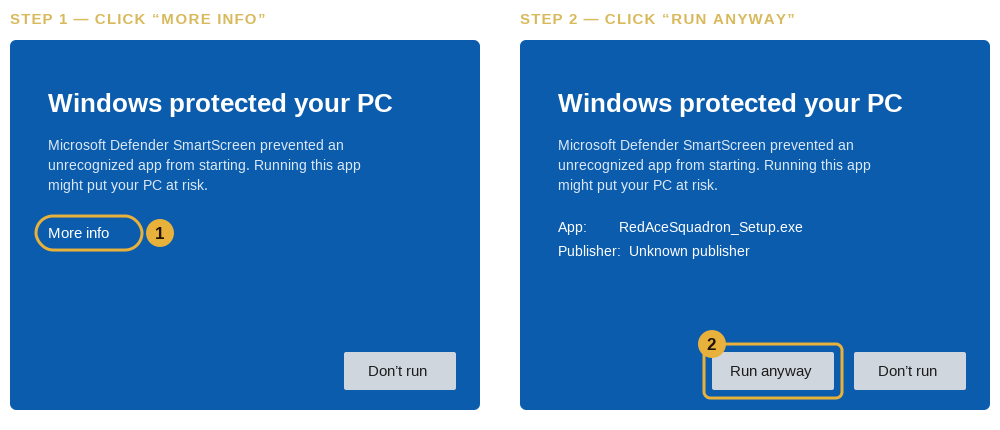
Our code-signing certificate is still being issued, so the very first run trips
Microsoft’s SmartScreen filter: a blue box saying
“Windows protected your PC.” That’s Windows saying it doesn’t
recognize a brand-new publisher yet, not that anything is wrong. Two clicks get you through:
Click More info, then Run anyway. You only see this once.
Run RedAceSquadron_Setup.exe. If your browser asks whether to keep the file, choose Keep.
On the blue SmartScreen box, click More info, then Run anyway.
Follow the installer. It sets up everything (DirectPlay, shortcuts) automatically.
Launch Red Ace Squadron and fly. For online play, go to Multiplayer > Server Browser.
Want certainty instead of trust? Verify the file. Open PowerShell and run
Get-FileHash "$env:USERPROFILE\Downloads\RedAceSquadron_Setup.exe".
The result must match this SHA-256, exactly:
Any graphics card from the last decade (the game is from 2001, your PC will laugh at it)
About 400 MB of disk space
Internet connection for multiplayer and updates only; no account of any kind required
The only official download is from redacesquadron.com, and it is free.
The SHA-256 checksum above is published for every release. If you would like to help fund
what comes next, you can support the revival.